See Also: Kangaroo Mobile Desktop USER GUIDE
|
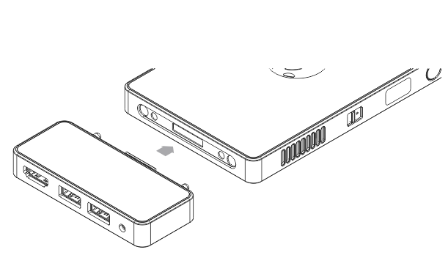
STEP-1: Attaching the Kangaroo Dock |
|
Attach the Kangaroo Mobile Desktop computing module to the Kangaroo Dock as shown in the illustration below.
|
|
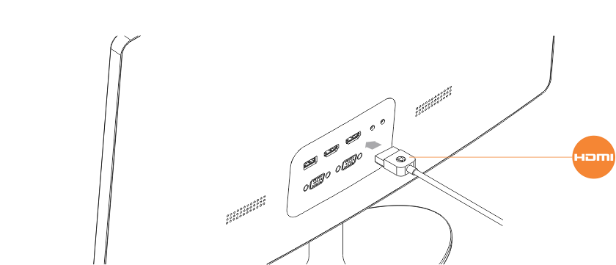
STEP-2: Connecting your HDMI Cable |
|
Attach an HDMI display cable, from your LCD monitor or television to the HDMI port on the Kangaroo Dock as shown.
Note: HDMI cable not included.
|
|
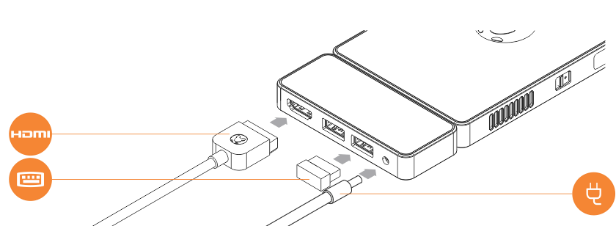
STEP-3: Attaching power and peripherals to the Kangaroo Dock |
|
Insert your USB keyboard/mouse controller into the USB port on the Kangaroo Dock, and attach the AC adapter.
|
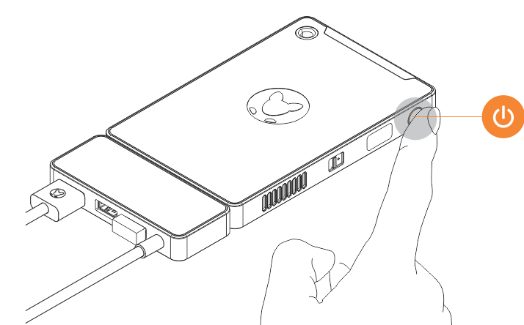
| STEP-4: Powering on the system for the first time. |
|
Press the power button on the computing module.
Important Note: To prepare the system for first-use, you must attach the AC Adapter and press the power button (for approximately 2 seconds).
See Also: Kangaroo Mobile Desktop USER GUIDE |
Comments